

Use folders for stable boundaries and tags for traits that can cross those boundaries.
Start with two retrieval questions
Imagine you saved a report on accessible checkout design. Tomorrow you may ask, 'What did we collect for the checkout redesign?' A month later the question may be, 'Where are our accessibility examples?' The same reference serves two routes. Choosing one structure for both makes either filing or searching harder.
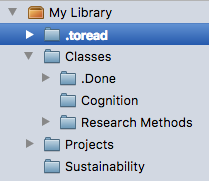
Give each structure a job

Folder or collection
Keeps references for one project or deliverable together.
- Example: Checkout redesign.
- Use it when you want to see the whole project together.
- Archive the project when its work is complete.
Tag
Identifies a topic that appears in several projects.
- Examples: accessibility, payments, user-testing.
- Use it to retrieve related references from different projects.
- Define the term so other people apply it consistently.
Check the app's actual model
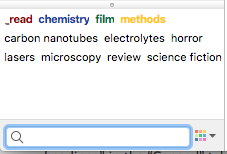
Zotero's collections and tags documentation explains that one item can belong to several collections without being duplicated. That is Zotero's model. Before copying this approach into another tool, test whether adding an item to a second folder moves it, references it or duplicates it.
Run a small comparison
Choose ten familiar references
Use material you actually need for a current project. Avoid importing your whole library for the experiment.
Write three real questions
Include a project question, a cross-project question and one where you remember only a source or format.
Try both routes
First retrieve through the project structure. Then use tags or search. Record whether you found the correct version.
Keep only the useful structure
Remove a tag that never changes a result. Rename a folder that you cannot recognize without opening it.
A decision table you can revisit
| Question | First route | Check |
|---|---|---|
| What belongs to this project? | Project folder / collection | The current and final versions are distinguishable. |
| Where are examples of this trait? | Tag or filtered search | The term has the same meaning across projects. |
| What was that specific source? | Text search plus source metadata | The original reference, not a duplicate, appears. |
Agree on folder and tag names
Folder and tag agreement
Share this with collaborators before reorganizing a collection.
Project boundary:
Folder name:
When the folder is archived:
Tag:
Definition in one sentence:
One item that belongs:
One item that does not belong:
Search this tag should help answer:
Sources and scope
- Collections and TagsZotero · 2025-07-29 · 2026-09-30
Documents Zotero's collection and tag model. Other apps may behave differently.
- Searching to Eliminate Personal Information ManagementMicrosoft Research · 2006-01 · 2026-09-30
Explains how retrieval can use remembered information across locations.